
Python Audio Visualizer - Waveforms and Spectrograms
Turn audio files into waveform and spectrogram PNGs. Download the app, or build the Python demo.
Within nova, we strip tools to their essence and rebuild them with intent.
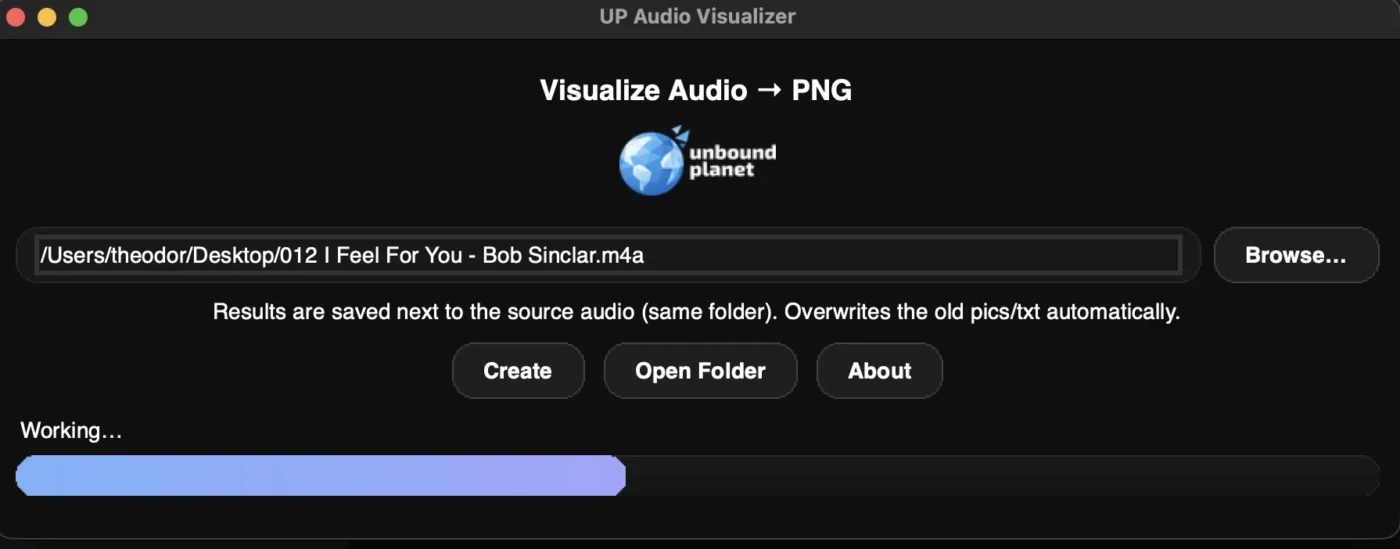
Unbound Planet Audio Visualizer is a free desktop app for analyzing audio files on Windows, Apple Silicon Macs and Linux. Pick a file, click Create, then find four PNGs and a TXT report beside your source. This is file analysis, not a live microphone display or an animation that follows playback. The downloads bundle the app and its dependencies, so you do not need a separate Python installation. Uses ffmpeg🔗.
Windows: SHA256f41885b177f1dd02bc24a88a40dcbac2e78799e29113986cd9960fd854a66693Copied! Mac: SHA256a463e394dcf65162457520fc5c131d246958a299b466d9c9340234b813dce9d0Copied! Linux: SHA256fc6afdfea8163ee3011a5185068716c08433ecd68fa83424238203fb1defd3e7Copied!
The app and guide are free, with no ads. Consider supporting unboundplanet.com.

I wanted the whole path in one place: choose an audio file, see what is inside it, and save the plots. No hunting for the missing half of a snippet.
Below, we'll build a compact demo with Tkinter, Librosa and Matplotlib: a waveform, linear and log-frequency spectrograms, an RMS plot and a tempo estimate in the log. The source is here to read, tweak and extend. The demo and the downloadable release are separate builds; the tutorial changes below do not update the v1.0 downloads.
What we'll build in the article:
1. Browse - Create flow with a small Tkinter window
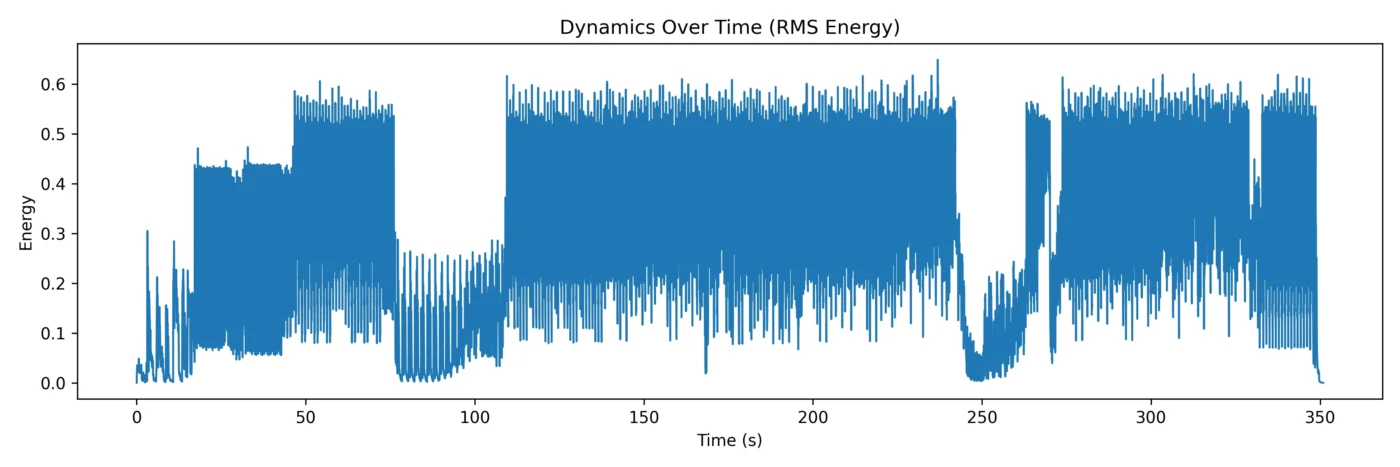
2. Four 300-DPI PNGs: waveform, linear-Hz spectrogram, log-frequency spectrogram and RMS dynamics
3. Estimated tempo in BPM and a readable log
4. Small, readable code you can adapt to your needs
What's in the full release (bundled above)
The same core analyses, with:
5. Packaged platform builds with FFmpeg and FFprobe
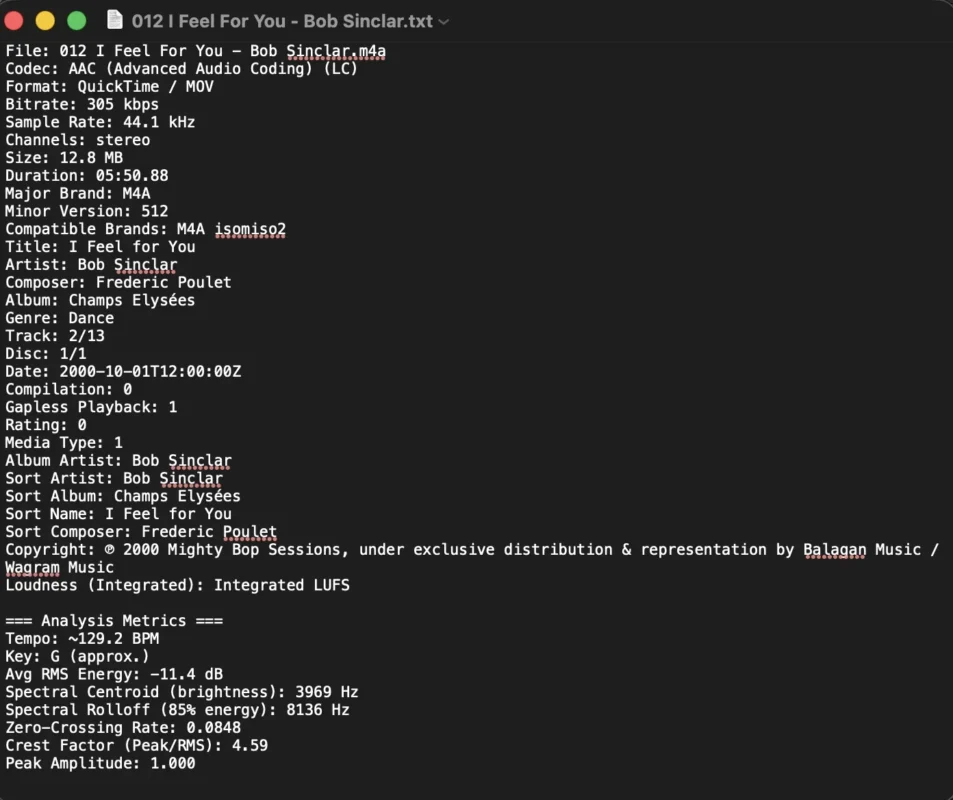
6. TXT report with available codec/tag information, duration, sample rate, channels, analysis metrics and embedded lyrics when present; integrated LUFS via FFmpeg ebur128 when available
7. Progress feedback and an Open Folder action. Both versions save beside the input and overwrite matching output names, so keep results you want to compare in another folder.
Pick your path:
a) "I just want to use it." - Download the full release above (Windows EXE, macOS DMG, Linux DEB).
b) "I want to understand it." - Follow the tutorial and build the demo from scratch. Start with a short file in a writable folder; long tracks need more memory and time. The demo prints BPM in its log and does not create the full release TXT/LUFS report.
My earlier tests covered Windows 11, macOS Sequoia and later versions, and Ubuntu 24.04, using Python 3.13 or later with MP3 and M4A files. That is my test history, not a promise that every OS, codec or future library version behaves the same.
The demo analyzes files locally with Python, Librosa and Matplotlib. FFmpeg supplies an explicit fallback when the native decoder cannot open a file. FFprobe is kept alongside it for the full release metadata tools; the DIY plots do not require a TXT report. Pick your platform accordion. Use the complete code at the end if you are skipping the explanation.
- Windows 10/11 x64
- Python 3.13 or 3.14 with Tkinter - Download here🔗
- FFmpeg (ffmpeg + ffprobe) - Download here🔗
- Recommended: Visual Studio Code - Download here🔗
The commands below use Command Prompt (cmd), not PowerShell. Keep the shell the same while setting up.
If you use the traditional python.org installer, keep pip and Tcl/Tk enabled. The Python test suite is optional for this demo.
IMPORTANT - Check "Add Python to environment variables" - this will give you Python in your Terminal app.
Open a cmd and type:python --version
If it prints your installed Python 3.13 or 3.14 version, you're golden.
We will put the project libraries in a virtual environment below.
After creating UPAV-demo in the next step, copybin/ffmpeg.exeand bin/ffprobe.exefrom the downloaded archive into that folder. Do not rename another file to .exe. Let's keep things tidy.
In cmd:
mkdir "%USERPROFILE%\UPAV-demo"
cd /d "%USERPROFILE%\UPAV-demo"
This is your working folder. Show file extensions in Explorer, create a text file, and name it demo.py
(orwhatever-you-want.py).
This isolates your Python packages from the system, like a portable box.
python -m venv .venv
call .venv\Scripts\activate.bat
- After activation, your prompt changes to:(.venv) C:\Users\username\UPAV-demo >
- To exit later: typedeactivate
While in(.venv)mode, type:
python -m pip install -U pip
python -m pip install "librosa==1.0.0" "matplotlib==3.11.2"
While in(.venv)mode, type:
python -c "import tkinter; print('Tkinter OK')"
python -c "import librosa; print('Librosa OK')"
python -c "import matplotlib; print('Matplotlib OK')"
ffmpeg -version
Run this check from UPAV-demo with ffmpeg.exe beside the script. Command Prompt searches the current folder; this is separate from the PATH setup the demo performs later. Add ffprobe -version as a second check. If either command fails, fix the location before continuing.
That's it! You can rollover to the next part.
- macOS: the owner's tests cover Sequoia and later versions. The v1.0 DMG is Apple Silicon only; the Python demo is a separate setup. Intel Macs were not tested here.
- Python 3.13 or 3.14 with Tkinter - Download here🔗
- FFmpeg (ffmpeg + ffprobe) - Download here🔗
- librosa and matplotlib in a virtualenv (I'll show you later how to)
- Recommended: Visual Studio Code - Download here🔗
Tip for later: Press ⌘ + Space, type Terminal, press Enter.
Install Python, defaults are fine.
After installation, open Terminal.
Type:python3 --version
Confirm the Python 3.13 or 3.14 interpreter you intend to use. Check Tkinter with python3 -m tkinter; close the small test window afterwards.
Use ffmpeg and ffprobe builds for your Mac architecture and put them in the project folder, or use Homebrew below. If macOS blocks a download, check its source and follow the app-specific option in System Settings -> Privacy & Security. Do not disable Gatekeeper globally.
You can also install ffmpeg systemwide by installing brew - Download here🔗
In a terminal, typebrew install ffmpeg.
Create UPAV-demo in your home folder and open Terminal there, or use the commands below. The screenshot shows another way to open a folder in Terminal:
mkdir -p ~/UPAV-demo
cd ~/UPAV-demo
python3 -m venv .venv
source .venv/bin/activate
python -m pip install -U pip
python -m pip install "librosa==1.0.0" "matplotlib==3.11.2"
python -c "import tkinter; print('Tkinter OK')"
python -c "import librosa; print('Librosa OK')"
python -c "import matplotlib; print('Matplotlib OK')"
ffmpeg -version
The shown ffmpeg command checks a PATH installation such as Homebrew. For a copied sibling executable, run ./ffmpeg -version and ./ffprobe -version from the project folder instead. If necessary, grant execute permission only to those trusted files with chmod +x ./ffmpeg ./ffprobe. The demo can discover those siblings when it starts.
That's it for Mac. You're ready for Part Two.
- Debian/Ubuntu (or derivative)
- Python 3.12, 3.13 or 3.14 with Tkinter and venv support - Python information🔗
- FFmpeg (ffmpeg + ffprobe) from your distribution packages; the existing linked macOS builds🔗
are not Linux downloads. - librosa and matplotlib in a virtualenv (I'll show you how below)
- Recommended: Visual Studio Code - Download here🔗
sudo apt update
sudo apt install -y python3 python3-venv python3-tk ffmpeg libsndfile1
Thepython3-tkpackage supplies the GUI.libsndfile1provides native format support; FFmpeg is the explicit fallback below. These apt commands use your distribution's Python, which may differ from my Python 3.13+ test history. Librosa 1.0 requires Python 3.12 or later. Check python3 --version before making the venv; if it is older, use a separately installed supported interpreter for the project rather than replacing the system Python.
mkdir -p ~/UPAV-demo
cd ~/UPAV-demo
Create a new text file (or .py via Visual Studio Code) here. If you prefer portable FFmpeg, you can also place ffmpeg and ffprobe execs here.
python3 -m venv .venv
source .venv/bin/activate
Your prompt should now start with(.venv)
python -m pip install -U pip
python -m pip install "librosa==1.0.0" "matplotlib==3.11.2"
This also installs dependencies such asnumpy, scipy and soundfile. Librosa 1.0 no longer supplies the old audioread fallback; the demo handles the FFmpeg retry explicitly.
python -c "import tkinter; print('Tkinter OK')"
python -c "import librosa; print('Librosa OK')"
python -c "import matplotlib; print('Matplotlib OK')"
ffmpeg -version
The last line checks the distribution's PATH installation. For copied sibling binaries, check ./ffmpeg -version and ./ffprobe -version from the project folder instead. The current directory is not normally on PATH in a Linux shell.
Ok, now that we're done with the prereqs, we can start having some fun. Open yourdemo.pyfile in VS Code (or your editor of choice). Before we touch any buttons, let's align on what we're building and how the audio actually gets decoded.
1.1) A tiny history detour
- Sound waves: For centuries, people have tried to capture how strings and pipes vibrate, but the shape of sound as a function of time became practical once we could record air pressure (late 19th/early 20th century) = your waveform plot shows the recorded sample amplitude over time, not calibrated pressure.
- Fourier's big idea (1807 - 1822): this incredibly smart french bloke stated that any signal can be expressed as a sum of sinusoids - he basically opened the math doorway to frequencies.

First function: "Fourier Transform" takes your sound wave in time and breaks it into frequencies (notes, pitches).
The second function: "Inverse Fourier Transform" takes those frequencies and rebuilds the original sound wave.
That is the core idea behind the STFT below. Librosa also handles loading, framing, beat tracking and other analysis.
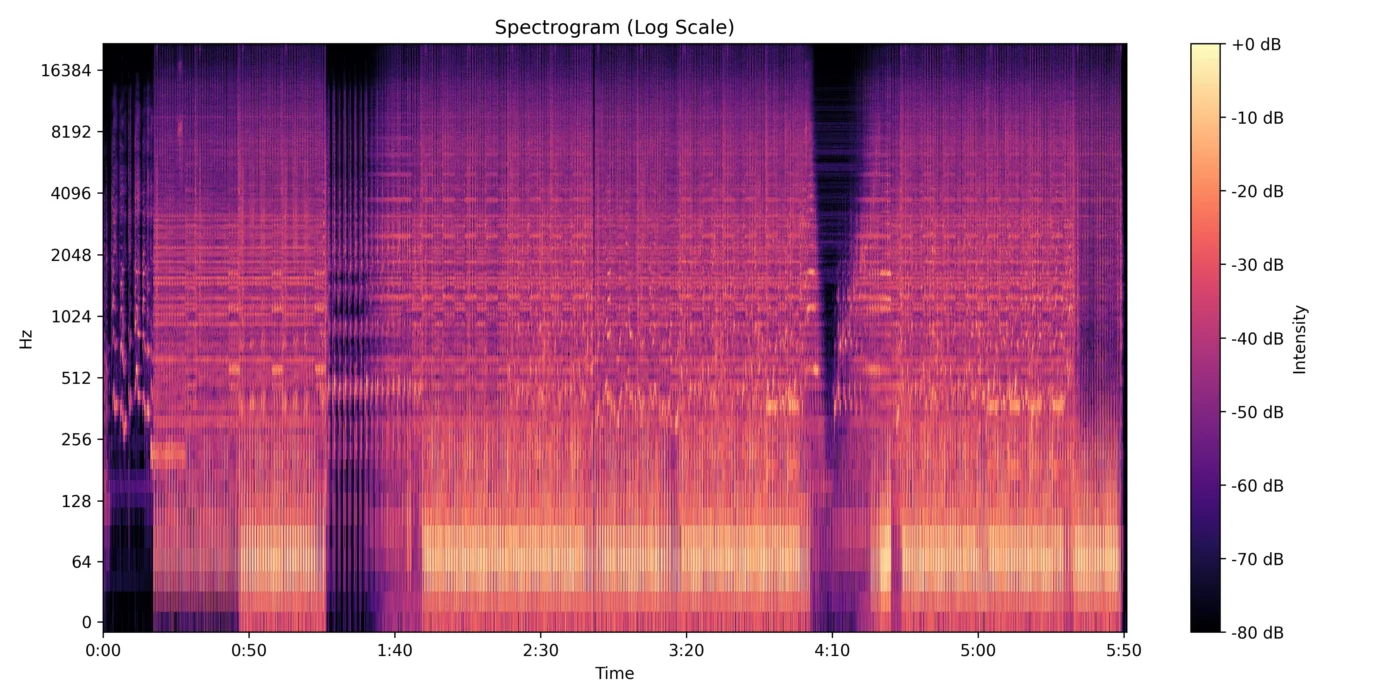
Spectrograms: Bell Labs popularized the sound spectrograph in the 1940s - "voiceprints" for speech and birdsong. Today we compute a short-time Fourier transform (STFT) slide-window, turn magnitudes to dB, and color them over time * frequency. The demo exports two spectrograms:
1. Linear Hz: literal frequency axis - good for high-frequency detail.
2. Log scale: compresses highs, expands lows - closer to how we hear.
Key vocabulary
- PCM (Pulse-Code Modulation): the audio as a list of numbers - samples of air pressure at evenly spaced times.
- Sample rate (sr): how many samples per second (e.g., 44,100). Higher sr gives more samples per second and a higher Nyquist limit; the STFT window and hop also determine the time/frequency tradeoff. We will use sr = None, no resampling, take the audio file as-is.
- y: a NumPy array of those samples. In this demo we use mono = True so y is 1-D (clean and fast). With stereo you'd get 2-D and choose/average channels.
- How does Python "know" where y and sr come from?
When you type this:
y, sr = load_audio(Path("song.mp3"), print)<br />
The helper below does three things:
1. Try Librosa's native loader first. The extension is not a reliable decoder-routing rule.
Librosa 1.0 uses SoundFile/libsndfile for native loading. Available formats depend on that decoder build.
If native loading fails, our helper asks FFmpeg to decode the first audio stream to a temporary mono float WAV, then loads that WAV. It removes the temporary file afterwards and leaves the source audio alone.
2. The decoder gives us PCM samples:
Think of PCM as a giant list of numbers: air pressure snapshots, one after another. Example: [0.0, 0.01, 0.04, -0.02, -0.05, ...].
3. The loader returns samples and a sample rate:
The samples are loaded as float32. Decoding integer PCM to floats is not peak normalization, and floating-point source audio can exceed -1 to +1. With sr=None we keep the file's sample rate, for example 44100 samples per second. mono=True mixes channels for the overview; it can hide stereo cancellation or channel differences.
Why y and sr are all we need:
- y = the actual signal - a NumPy array we can plot, transform, measure.
- sr = the time ruler - tells us how far apart the samples are (1/44100s, 1/48000s, etc.).
Every graph we'll draw (waveform, spectrograms, dynamics) is basically:
"Take y, line it up with sr, and re-visualize it in a clever way."
1.2) The pseudocode
- Start app
- on Browse..., user picks an audio file
- ensure_ffmpeg()
- find ffmpeg/ffprobe next to script/app (and macOS .../Resources if packed)
- add that folder to PATH
- on POSIX (Mac & Linux), set exec bits if needed (chmod +x)
- version sanity check
- analyze(path)
- log what we're doing
- load_audio(path, log_cb) - try native loading, then an explicit FFmpeg fallback if needed
- native load: SoundFile/libsndfile, with original sample rate and mono=True
- on decoder failure: ffmpeg -> temporary float WAV -> native load
- returns: y (samples), sr (sample rate)
- compute STFT - magnitude dB for spectrograms
- plot + save: waveform, spectrogram (linear Hz), spectrogram (log)
- compute tempo (beat track)
- compute & save RMS dynamics
- log saved paths
- UI: show logs, keep app responsive with a background thread
1.3) Codecrafting
Imports (the pit crew):
os, sys, stat, shutil, subprocess, threading, traceback, Path
Files, folders, permissions (exec bits), temporary decoding files, running small commands, a background thread and readable error logs.
matplotlib.use("Agg")
A file renderer: saves PNGs without opening plot windows. The Tkinter file picker still needs a desktop session.
matplotlib.pyplot as plt, numpy as np
Plotting and fast number-crunching.
librosa, librosa.display
Audio I/O (decoding), analysis (STFT/tempo/RMS), and pretty helpers for plots.
tkinter, filedialog, messagebox
The tiny GUI: pick file, show status, pop an error if something goes boom.
UI labels and copy (the face):
APP_TITLE - Window title.
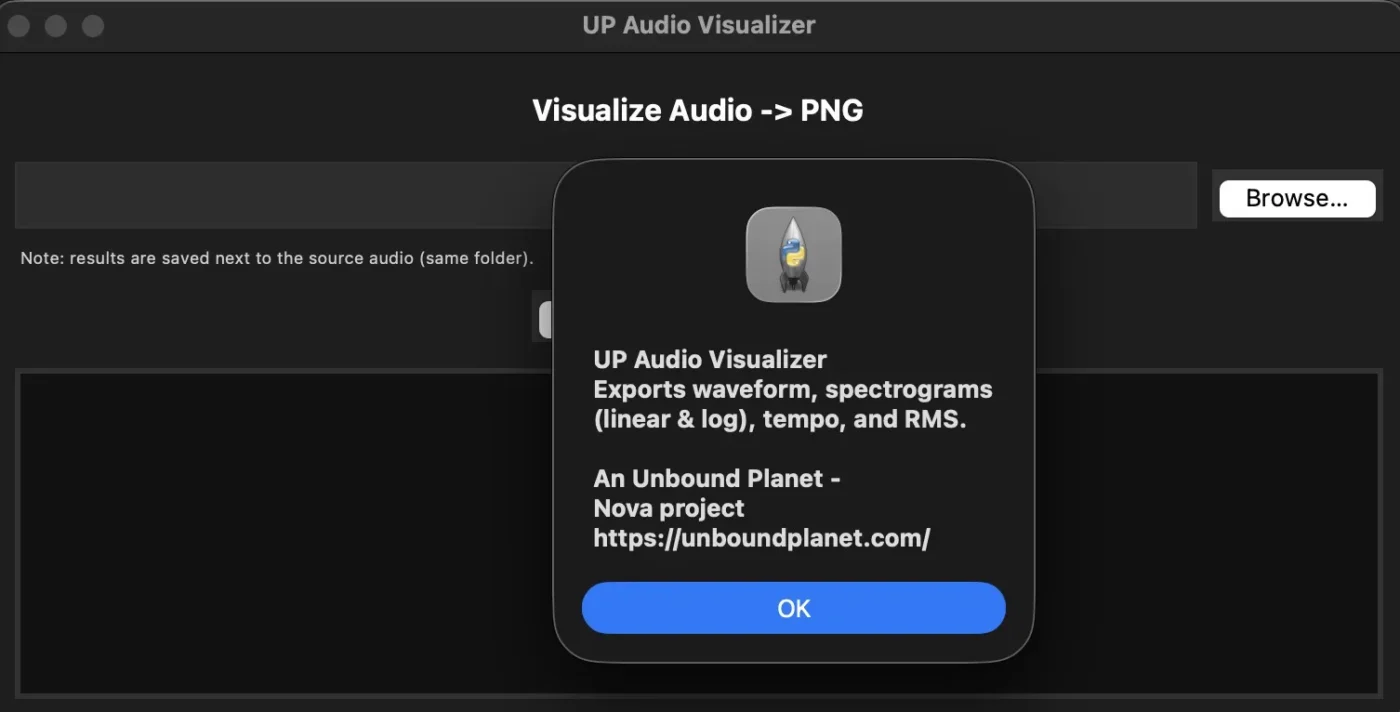
ABOUT_TEXT - the About dialog - what the app does and where it lives.
AUDIO_FILTERS - the file picker's whitelist (WAV, FLAC, MP3, OGG, M4A, AAC, AIFF...).
That's it for this part: you now know what gets decoded.
A beginner's tip: CAREFUL with Python's indentations, they are basically the {} brackets of C, or the begin and end of any function. Having the wrong indentation will break the code.
Start writing the initial part:
import os, sys, stat, shutil, subprocess, tempfile, threading, traceback
from pathlib import Path
import matplotlib
matplotlib.use("Agg")
import matplotlib.pyplot as plt
import numpy as np
import librosa
import librosa.display
import tkinter as tk
from tkinter import filedialog, messagebox
APP_TITLE = "UP Audio Visualizer"
ABOUT_TEXT = (
"UP Audio Visualizer\n"
"Exports waveform, spectrograms (linear & log), tempo, and RMS.\n\n"
"An Unbound Planet - Nova project\n"
"https://unboundplanet.com/"
)
AUDIO_FILTERS = [
("Audio files", "*.wav *.flac *.mp3 *.ogg *.m4a *.aac *.aiff *.aif *.aifc"),
("All files", "*.*"),
]
Reminders:
Native decoder support varies by format and build. This block finds FFmpeg and FFprobe; the load_audio helper then explicitly retries a failed native load through FFmpeg. It:
What this buys you
3.1 Where's "here"?
Current app folder:
- from source (.py location)
- inside a PyInstaller bundle - packaging is a separate step from this source-code demo
- inside a MacOS .app
# ---------- FFmpeg discovery and explicit decoder fallback ----------
def _bundle_dir() -> Path:
if getattr(sys, "_MEIPASS", None): # PyInstaller onefile/onedir
return Path(sys._MEIPASS)
if getattr(sys, "frozen", False): # other freezers
return Path(sys.executable).resolve().parent
return Path(__file__).resolve().parent # running from source
Quick stuff:
- _MEIPASS: the bundle data directory; a one-file build extracts it temporarily.
- sys.frozen: "Hey, I'm a frozen exe in time!"
- Fallback: source folder of the .py.
3.2 Make FFmpeg findable and executable
Function:
- builds candidate directories to search (current, parent, macOS /Resources)
- checks candidate folders for both tools, then probes their exit status
- on POSIX (mac/linux) ensures they're executable
- prepends that directory to PATH
- pings both with -version and logs that all is good.
def ensure_ffmpeg(log=print) -> bool:
"""Try to make ffmpeg/ffprobe available on PATH; return True if usable."""
IS_WIN = (os.name == "nt")
IS_MAC = (sys.platform == "darwin")
ffm = "ffmpeg.exe" if IS_WIN else "ffmpeg"
ffp = "ffprobe.exe" if IS_WIN else "ffprobe"
# candidate dirs: next to script/exe, its parent, macOS Resources
dirs = []
bd = _bundle_dir()
dirs += [bd, bd.parent, Path(sys.executable).resolve().parent]
if IS_MAC:
# Cover script/frozen macOS bundle layouts.
dirs += [bd / "Resources", bd.parent / "Resources", bd.parent.parent / "Resources"]
# if both binaries live in any candidate dir, prepend it to PATH
for d in dirs:
f1, f2 = d / ffm, d / ffp
if f1.exists() and f2.exists():
for p in (f1, f2):
try:
mode = os.stat(p).st_mode
if not (mode & stat.S_IXUSR):
os.chmod(p, mode | stat.S_IXUSR | stat.S_IXGRP | stat.S_IXOTH)
except Exception:
pass
os.environ["PATH"] = str(d) + os.pathsep + os.environ.get("PATH", "")
break
def _ok(cmd):
try:
subprocess.run([cmd, "-version"], stdout=subprocess.PIPE, stderr=subprocess.STDOUT,
timeout=3, check=True,
creationflags=subprocess.CREATE_NO_WINDOW if IS_WIN else 0)
return True
except Exception:
return False
has = _ok("ffmpeg") and _ok("ffprobe")
if has:
log("[OK] FFmpeg detected.")
else:
log("[!] FFmpeg/ffprobe unavailable. Native loading may work; the FFmpeg fallback needs ffmpeg.")
return has
def load_audio(audio_path: Path, log_cb=print):
"""Try native loading, then explicitly decode a local file with FFmpeg."""
try:
return librosa.load(str(audio_path), sr=None, mono=True)
except Exception as load_error:
ffmpeg_path = shutil.which("ffmpeg")
if not ffmpeg_path:
raise RuntimeError(
"Native decoding failed. Put a compatible ffmpeg executable "
"beside demo.py or install FFmpeg, then retry. " + str(load_error)
) from load_error
log_cb("[i] Native decoding failed; trying FFmpeg.")
with tempfile.TemporaryDirectory(prefix="upav-") as folder:
decoded = Path(folder) / "decoded.wav"
result = subprocess.run(
[ffmpeg_path, "-nostdin", "-hide_banner", "-loglevel", "error",
"-y", "-i", str(audio_path), "-map", "0:a:0", "-vn", "-ac", "1",
"-c:a", "pcm_f32le", str(decoded)],
stdout=subprocess.PIPE, stderr=subprocess.PIPE, text=True,
creationflags=subprocess.CREATE_NO_WINDOW if os.name == "nt" else 0,
)
if result.returncode != 0:
detail = result.stderr.strip() or f"Exit status {result.returncode}"
raise RuntimeError("FFmpeg could not decode this file: " + detail) from load_error
return librosa.load(str(decoded), sr=None, mono=True)
Human stuff:
- ffmpeg handles the decoder fallback. ffprobe supplies metadata in the full release; the small DIY demo does not write that report.
- Prepending (not appending) means your local copy wins, even if the system has an older one.
- On macOS/Linux, downloaded binaries may lack the exec bit - this fixes it.
The load_audio helper in this block tries Librosa first. On failure, it decodes through FFmpeg into a temporary WAV and retries. An invalid or unsupported file can still fail; the log should explain why.
Next up, fun stuff: turn y + sr into the pictures (waveform and spectrograms) and log the tempo like pros.
Let's do the analysis part. Copy-ready snippets included.
4.1 Resolve paths & name outputs
On POSIX, we expand ~. On everything, we resolve the file and precompute where the png plots will go and how they'll be named:
# ---------- Analysis ----------
def analyze(audio_path: Path, log_cb=print):
# Discover optional local decoder tools before loading.
ensure_ffmpeg(log_cb)
audio_path = audio_path.expanduser().resolve(strict=True)
out_dir = audio_path.parent
out_prefix = audio_path.stem
def out(name: str) -> Path:
return out_dir / f"{out_prefix}_{name}.png"
Quick stuff:
Predictable filenames ('MySong_waveform.png', etc.), saved next to the source.
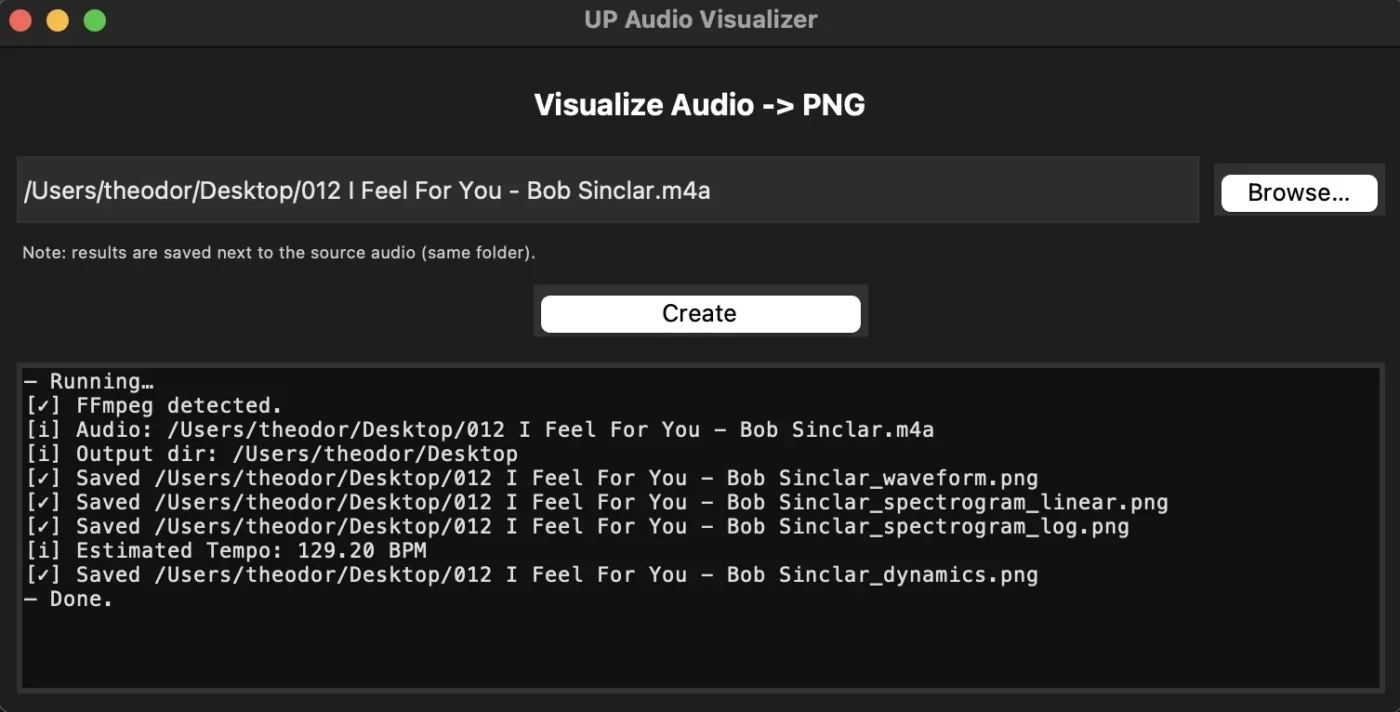
4.2 Friendly logs + decoder check
We log the selected file and output folder. The decoder check makes missing tools visible; it cannot guarantee every codec or file will work.
log_cb(f"[i] Audio: {audio_path}")
log_cb(f"[i] Output dir: {out_dir}")
4.3 Load audio with a native decoder and FFmpeg fallback
load_audio returns y (PCM samples) and sr (sample rate).
- sr = None - keep original, no resampling.
- mono = True - a 1-D overview. It mixes the channels; inspecting stereo needs separate channel handling and plots.
# Load mono audio, with an explicit FFmpeg retry if native loading fails.
y, sr = load_audio(audio_path, log_cb)
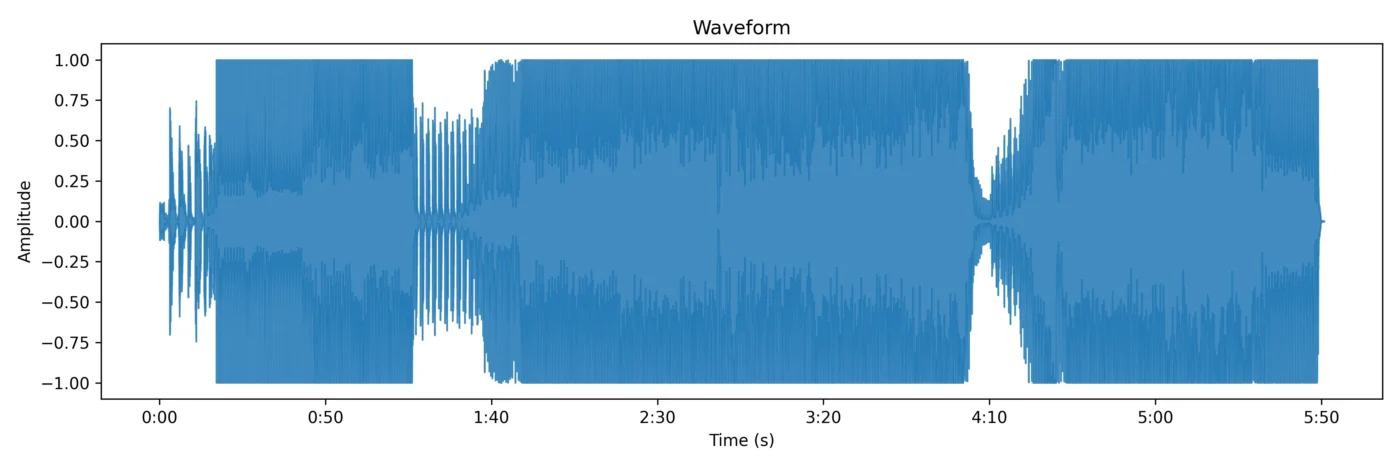
4.4 Waveform (amplitude over time)
Single figure, tight layout, 300 DPI export.
# Waveform
plt.figure(figsize=(12, 4))
librosa.display.waveshow(y, sr=sr, alpha=0.85)
plt.title("Waveform")
plt.xlabel("Time (s)")
plt.ylabel("Amplitude")
plt.tight_layout()
wf_path = out("waveform")
plt.savefig(wf_path, dpi=300)
plt.close()
log_cb(f"[OK] Saved {wf_path}")
4.5 Spectrograms (time * frequency, in dB)
We do an STFT (short-time Fourier transform) with a 2048-sample window and 512-sample hop.
- Bigger n_fft = finer frequency detail, blurrier time.
- Smaller hop_length = more time frames and more computation. Window length still limits time resolution.
Compute STFT + dB scale:
# Spectrograms
S = librosa.stft(y, n_fft=2048, hop_length=512, win_length=2048)
S_db = librosa.amplitude_to_db(np.abs(S), ref=np.max)
Linear-Hz spectrogram (great for highs):
# Linear
plt.figure(figsize=(12, 6))
librosa.display.specshow(S_db, sr=sr, hop_length=512, x_axis="time", y_axis="hz", cmap="magma")
plt.colorbar(format="%+2.0f dB", label="dB relative to file maximum")
plt.title("Spectrogram (Linear Hz)")
plt.tight_layout()
sp_lin_path = out("spectrogram_linear")
plt.savefig(sp_lin_path, dpi=300)
plt.close()
log_cb(f"[OK] Saved {sp_lin_path}")
Log-frequency spectrogram (closer to hearing):
# Log
plt.figure(figsize=(12, 6))
librosa.display.specshow(S_db, sr=sr, hop_length=512, x_axis="time", y_axis="log", cmap="magma")
plt.colorbar(format="%+2.0f dB", label="dB relative to file maximum")
plt.title("Spectrogram (Log Scale)")
plt.tight_layout()
sp_log_path = out("spectrogram_log")
plt.savefig(sp_log_path, dpi=300)
plt.close()
log_cb(f"[OK] Saved {sp_log_path}")
4.6 Tempo (quick estimate)
We try beat tracking, then fall back to the median of per-frame tempo estimates. It's an estimate, not a musicologist. Half-time and double-time results happen; listen before treating the number as a verdict.
# Tempo
try:
tempo, _ = librosa.beat.beat_track(y=y, sr=sr)
tempo_scalar = float(np.asarray(tempo).reshape(-1)[0])
except Exception:
t_arr = librosa.feature.tempo(y=y, sr=sr, aggregate=None)
tempo_scalar = float(np.median(np.asarray(t_arr)))
log_cb(f"[i] Estimated Tempo: {tempo_scalar:.2f} BPM")
Tips: Very sparse, ambient, or purely percussive signals can confuse tempo. Acceptable.
4.7 Dynamics (RMS over time)
RMS is a short-window signal-amplitude measure, not perceived loudness or LUFS. We compute frame-wise RMS, align a time axis, and plot it. The spectrogram dB values are relative to the file's maximum magnitude, not calibrated sound-pressure levels.
# Dynamics (RMS)
rms = librosa.feature.rms(y=y, frame_length=2048, hop_length=512)[0]
times = librosa.times_like(rms, sr=sr, hop_length=512)
plt.figure(figsize=(12, 4))
plt.plot(times, rms, linewidth=1.2)
plt.title("Dynamics Over Time (RMS Energy)")
plt.xlabel("Time (s)")
plt.ylabel("RMS amplitude")
plt.tight_layout()
dyn_path = out("dynamics")
plt.savefig(dyn_path, dpi=300)
plt.close()
log_cb(f"[OK] Saved {dyn_path}")
That's all folks! (with the analysis).
You: pick a file -> ensure_ffmpeg -> load -> plot & save -> tempo -> RMS.
The UI logs each step, and you get four 300-DPI images you can drop into docs or socials. Speaking of UI's, let's craft it now.
Goal: a small window with background analysis and readable logs. First-run imports and long files can still take time.
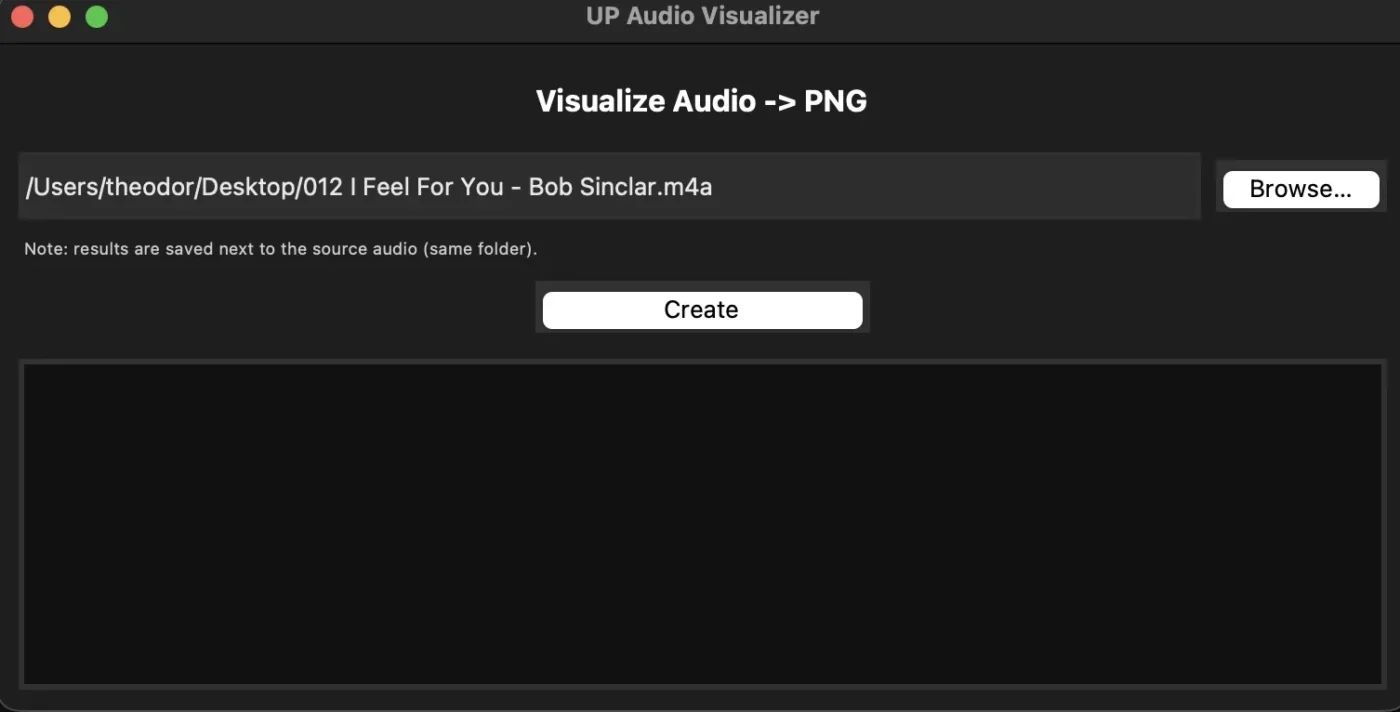
5.1 Window skeleton (title, size, theme)
Creates the Tk root, sets a dark background, and calls our builders.
# ---------- UI ----------
class App(tk.Tk):
def __init__(self):
super().__init__()
self.title(APP_TITLE)
self.geometry("760x360")
self.configure(bg="#1e1e1e")
self._build_menu()
self._build_ui()
self._busy = False
5.2 Help -> About (learn to make menus and dialogs)
Simple top-bar menu with a single About action.
def _build_menu(self):
m = tk.Menu(self)
helpm = tk.Menu(m, tearoff=0)
helpm.add_command(label="About", command=lambda: messagebox.showinfo("About", ABOUT_TEXT))
m.add_cascade(label="Help", menu=helpm)
self.config(menu=m)
5.3 File row (Entry + Browse...)
One line to show the chosen path and a button to pick files. Uses our AUDIO_FILTERS so the chooser only lists known formats.
def _build_ui(self):
pad = 12
title = tk.Label(
self,
text="Visualize Audio -> PNG",
fg="#ffffff",
bg="#1e1e1e",
font=("Segoe UI", 16, "bold")
)
title.pack(pady=(18, 8))
row = tk.Frame(self, bg="#1e1e1e")
row.pack(fill="x", padx=pad, pady=(8, 4))
self.path_var = tk.StringVar()
entry = tk.Entry(
row,
textvariable=self.path_var,
bg="#2d2d2d",
fg="#e6e6e6",
insertbackground="#e6e6e6",
relief="flat",
highlightthickness=1
)
entry.pack(side="left", fill="x", expand=True, ipady=6)
def browse():
p = filedialog.askopenfilename(
title="Choose audio file",
filetypes=AUDIO_FILTERS,
initialdir=str(Path.home())
)
if p:
self.path_var.set(p)
btn = tk.Button(row, text="Browse...", command=browse)
btn.pack(side="left", padx=(8, 0))
Small note: you can paste a path into the Entry. Native file drag-and-drop is not implemented in this Tkinter demo.
5.4 Heads-up note + Create button
A tiny reminder that outputs live next to your source file, plus the main Create action.
note = tk.Label(
self,
text="Note: results are saved next to the source audio (same folder).",
fg="#cccccc",
bg="#1e1e1e",
font=("Segoe UI", 9)
)
note.pack(anchor="w", padx=pad, pady=(2, 10))
create = tk.Button(self, text="Create", command=self._on_create, width=16)
create.pack(pady=(0, 8))
5.5 Log panel (append-only console)
A simple Text widget acts as our console. We add one helper to append and auto-scroll.
self.log_box = tk.Text(
self,
height=10,
bg="#111111",
fg="#dcdcdc",
insertbackground="#dcdcdc",
relief="flat"
)
self.log_box.pack(fill="both", expand=True, padx=pad, pady=(6, 12))
def _log(self, msg: str):
self.log_box.insert("end", msg + "\n")
self.log_box.see("end")
self.update_idletasks()
def _log_async(self, msg: str):
self.after(0, lambda: self._log(msg))
5.6 Don't freeze the window (background thread)
Heavy work runs outside the UI thread. We also guard against the empty path case and surface nice errors.
The main Tk event loop must stay running while the worker schedules callbacks. We capture the error text before scheduling its dialog and guard against starting a second analysis at the same time. This is a small demo, not a cancellation or job-queue system.
def _on_create(self):
if self._busy:
return
path = self.path_var.get().strip()
if not path:
messagebox.showwarning("Missing file", "Choose an audio file first.")
return
p = Path(path)
self._busy = True
def worker():
try:
self._log_async("- Running...")
analyze(p, log_cb=self._log_async)
self._log_async("- Done.")
except Exception as e:
tb = "".join(traceback.format_exception(e))
error_text = str(e)
def show_err(message=error_text, details=tb):
self._log(f"! Error:\n{details}")
messagebox.showerror("Error", message)
self.after(0, show_err)
finally:
self.after(0, lambda: setattr(self, "_busy", False))
threading.Thread(target=worker, daemon=True).start()
The scheduled callbacks update the GUI through its event loop. Wait for the current analysis before starting another; keep the window open until it finishes.
5.7 Liftoff
At the very bottom of the file, we add:
if __name__ == "__main__":
App().mainloop()
Why this line exists:
In Python, files can be imported as modules or executed as scripts.
Theif __name__ == "__main__":check means: Only run this block if the file is launched directly (python demo.py).
If someone imports demo.py in another script, the GUI won't suddenly pop up - only the functions and classes are imported.
That's the demo. With the environment active, run python demo.py, choose a short audio file and click Create. Four PNGs appear beside it; BPM stays in the log. The demo needs the Python environment above, while the download is the packaged app.
Goal: Don't have time, gimme the full thing.
import os, sys, stat, shutil, subprocess, tempfile, threading, traceback
from pathlib import Path
import matplotlib
matplotlib.use("Agg")
import matplotlib.pyplot as plt
import numpy as np
import librosa
import librosa.display
import tkinter as tk
from tkinter import filedialog, messagebox
APP_TITLE = "UP Audio Visualizer"
ABOUT_TEXT = (
"UP Audio Visualizer\n"
"Exports waveform, spectrograms (linear & log), tempo, and RMS.\n\n"
"An Unbound Planet - Nova project\n"
"https://unboundplanet.com/"
)
AUDIO_FILTERS = [
("Audio files", "*.wav *.flac *.mp3 *.ogg *.m4a *.aac *.aiff *.aif *.aifc"),
("All files", "*.*"),
]
# ---------- FFmpeg discovery and explicit decoder fallback ----------
def _bundle_dir() -> Path:
if getattr(sys, "_MEIPASS", None): # PyInstaller onefile/onedir
return Path(sys._MEIPASS)
if getattr(sys, "frozen", False): # other freezers
return Path(sys.executable).resolve().parent
return Path(__file__).resolve().parent # running from source
def ensure_ffmpeg(log=print) -> bool:
"""Try to make ffmpeg/ffprobe available on PATH; return True if usable."""
IS_WIN = (os.name == "nt")
IS_MAC = (sys.platform == "darwin")
ffm = "ffmpeg.exe" if IS_WIN else "ffmpeg"
ffp = "ffprobe.exe" if IS_WIN else "ffprobe"
# candidate dirs: next to script/exe, its parent, macOS Resources
dirs = []
bd = _bundle_dir()
dirs += [bd, bd.parent, Path(sys.executable).resolve().parent]
if IS_MAC:
# Cover script/frozen macOS bundle layouts.
dirs += [bd / "Resources", bd.parent / "Resources", bd.parent.parent / "Resources"]
# if both binaries live in any candidate dir, prepend it to PATH
for d in dirs:
f1, f2 = d / ffm, d / ffp
if f1.exists() and f2.exists():
for p in (f1, f2):
try:
mode = os.stat(p).st_mode
if not (mode & stat.S_IXUSR):
os.chmod(p, mode | stat.S_IXUSR | stat.S_IXGRP | stat.S_IXOTH)
except Exception:
pass
os.environ["PATH"] = str(d) + os.pathsep + os.environ.get("PATH", "")
break
def _ok(cmd):
try:
subprocess.run([cmd, "-version"], stdout=subprocess.PIPE, stderr=subprocess.STDOUT,
timeout=3, check=True,
creationflags=subprocess.CREATE_NO_WINDOW if IS_WIN else 0)
return True
except Exception:
return False
has = _ok("ffmpeg") and _ok("ffprobe")
if has:
log("[OK] FFmpeg detected.")
else:
log("[!] FFmpeg/ffprobe unavailable. Native loading may work; the FFmpeg fallback needs ffmpeg.")
return has
def load_audio(audio_path: Path, log_cb=print):
"""Try native loading, then explicitly decode a local file with FFmpeg."""
try:
return librosa.load(str(audio_path), sr=None, mono=True)
except Exception as load_error:
ffmpeg_path = shutil.which("ffmpeg")
if not ffmpeg_path:
raise RuntimeError(
"Native decoding failed. Put a compatible ffmpeg executable "
"beside demo.py or install FFmpeg, then retry. " + str(load_error)
) from load_error
log_cb("[i] Native decoding failed; trying FFmpeg.")
with tempfile.TemporaryDirectory(prefix="upav-") as folder:
decoded = Path(folder) / "decoded.wav"
result = subprocess.run(
[ffmpeg_path, "-nostdin", "-hide_banner", "-loglevel", "error",
"-y", "-i", str(audio_path), "-map", "0:a:0", "-vn", "-ac", "1",
"-c:a", "pcm_f32le", str(decoded)],
stdout=subprocess.PIPE, stderr=subprocess.PIPE, text=True,
creationflags=subprocess.CREATE_NO_WINDOW if os.name == "nt" else 0,
)
if result.returncode != 0:
detail = result.stderr.strip() or f"Exit status {result.returncode}"
raise RuntimeError("FFmpeg could not decode this file: " + detail) from load_error
return librosa.load(str(decoded), sr=None, mono=True)
# ---------- Analysis ----------
def analyze(audio_path: Path, log_cb=print):
# Discover optional local decoder tools before loading.
ensure_ffmpeg(log_cb)
audio_path = audio_path.expanduser().resolve(strict=True)
out_dir = audio_path.parent
out_prefix = audio_path.stem
def out(name: str) -> Path:
return out_dir / f"{out_prefix}_{name}.png"
log_cb(f"[i] Audio: {audio_path}")
log_cb(f"[i] Output dir: {out_dir}")
# Load mono audio, with an explicit FFmpeg retry if native loading fails.
y, sr = load_audio(audio_path, log_cb)
# Waveform
plt.figure(figsize=(12, 4))
librosa.display.waveshow(y, sr=sr, alpha=0.85)
plt.title("Waveform")
plt.xlabel("Time (s)")
plt.ylabel("Amplitude")
plt.tight_layout()
wf_path = out("waveform")
plt.savefig(wf_path, dpi=300)
plt.close()
log_cb(f"[OK] Saved {wf_path}")
# Spectrograms
S = librosa.stft(y, n_fft=2048, hop_length=512, win_length=2048)
S_db = librosa.amplitude_to_db(np.abs(S), ref=np.max)
# Linear
plt.figure(figsize=(12, 6))
librosa.display.specshow(S_db, sr=sr, hop_length=512, x_axis="time", y_axis="hz", cmap="magma")
plt.colorbar(format="%+2.0f dB", label="dB relative to file maximum")
plt.title("Spectrogram (Linear Hz)")
plt.tight_layout()
sp_lin_path = out("spectrogram_linear")
plt.savefig(sp_lin_path, dpi=300)
plt.close()
log_cb(f"[OK] Saved {sp_lin_path}")
# Log
plt.figure(figsize=(12, 6))
librosa.display.specshow(S_db, sr=sr, hop_length=512, x_axis="time", y_axis="log", cmap="magma")
plt.colorbar(format="%+2.0f dB", label="dB relative to file maximum")
plt.title("Spectrogram (Log Scale)")
plt.tight_layout()
sp_log_path = out("spectrogram_log")
plt.savefig(sp_log_path, dpi=300)
plt.close()
log_cb(f"[OK] Saved {sp_log_path}")
# Tempo
try:
tempo, _ = librosa.beat.beat_track(y=y, sr=sr)
tempo_scalar = float(np.asarray(tempo).reshape(-1)[0])
except Exception:
t_arr = librosa.feature.tempo(y=y, sr=sr, aggregate=None)
tempo_scalar = float(np.median(np.asarray(t_arr)))
log_cb(f"[i] Estimated Tempo: {tempo_scalar:.2f} BPM")
# Dynamics (RMS)
rms = librosa.feature.rms(y=y, frame_length=2048, hop_length=512)[0]
times = librosa.times_like(rms, sr=sr, hop_length=512)
plt.figure(figsize=(12, 4))
plt.plot(times, rms, linewidth=1.2)
plt.title("Dynamics Over Time (RMS Energy)")
plt.xlabel("Time (s)")
plt.ylabel("RMS amplitude")
plt.tight_layout()
dyn_path = out("dynamics")
plt.savefig(dyn_path, dpi=300)
plt.close()
log_cb(f"[OK] Saved {dyn_path}")
# ---------- UI ----------
class App(tk.Tk):
def __init__(self):
super().__init__()
self.title(APP_TITLE)
self.geometry("760x360")
self.configure(bg="#1e1e1e")
self._build_menu()
self._build_ui()
self._busy = False
def _build_menu(self):
m = tk.Menu(self)
helpm = tk.Menu(m, tearoff=0)
helpm.add_command(label="About", command=lambda: messagebox.showinfo("About", ABOUT_TEXT))
m.add_cascade(label="Help", menu=helpm)
self.config(menu=m)
def _build_ui(self):
pad = 12
title = tk.Label(
self,
text="Visualize Audio -> PNG",
fg="#ffffff",
bg="#1e1e1e",
font=("Segoe UI", 16, "bold")
)
title.pack(pady=(18, 8))
row = tk.Frame(self, bg="#1e1e1e")
row.pack(fill="x", padx=pad, pady=(8, 4))
self.path_var = tk.StringVar()
entry = tk.Entry(
row,
textvariable=self.path_var,
bg="#2d2d2d",
fg="#e6e6e6",
insertbackground="#e6e6e6",
relief="flat",
highlightthickness=1
)
entry.pack(side="left", fill="x", expand=True, ipady=6)
def browse():
p = filedialog.askopenfilename(
title="Choose audio file",
filetypes=AUDIO_FILTERS,
initialdir=str(Path.home())
)
if p:
self.path_var.set(p)
btn = tk.Button(row, text="Browse...", command=browse)
btn.pack(side="left", padx=(8, 0))
note = tk.Label(
self,
text="Note: results are saved next to the source audio (same folder).",
fg="#cccccc",
bg="#1e1e1e",
font=("Segoe UI", 9)
)
note.pack(anchor="w", padx=pad, pady=(2, 10))
create = tk.Button(self, text="Create", command=self._on_create, width=16)
create.pack(pady=(0, 8))
self.log_box = tk.Text(
self,
height=10,
bg="#111111",
fg="#dcdcdc",
insertbackground="#dcdcdc",
relief="flat"
)
self.log_box.pack(fill="both", expand=True, padx=pad, pady=(6, 12))
def _log(self, msg: str):
self.log_box.insert("end", msg + "\n")
self.log_box.see("end")
self.update_idletasks()
def _log_async(self, msg: str):
self.after(0, lambda: self._log(msg))
def _on_create(self):
if self._busy:
return
path = self.path_var.get().strip()
if not path:
messagebox.showwarning("Missing file", "Choose an audio file first.")
return
p = Path(path)
self._busy = True
def worker():
try:
self._log_async("- Running...")
analyze(p, log_cb=self._log_async)
self._log_async("- Done.")
except Exception as e:
tb = "".join(traceback.format_exception(e))
error_text = str(e)
def show_err(message=error_text, details=tb):
self._log(f"! Error:\n{details}")
messagebox.showerror("Error", message)
self.after(0, show_err)
finally:
self.after(0, lambda: setattr(self, "_busy", False))
threading.Thread(target=worker, daemon=True).start()
if __name__ == "__main__":
App().mainloop()
That's the demo. With the environment active, run python demo.py, choose a short audio file and click Create. Four PNGs appear beside it; BPM stays in the log. The demo needs the Python environment above, while the download is the packaged app.
You now have two paths: use the packaged Audio Visualizer, or keep tinkering with the Python demo. A waveform shows the shape, a spectrogram shows where the frequencies sit, and the RMS plot helps you spot changes in signal level. The BPM estimate is a starting point, not the final word.
I used the analyzer in my Balatro soundtrack notes. There is the tool applied to music rather than a test signal. On nova, the goal stays the same: useful tools, fewer moving parts. Thanks for reading - you're awesome.
Of course, much more stuff is coming soon, so:
Stay tuned right here, on Unbound Planet, with your favorite host.
--Theo
Contact me🔗 for suggestions, feedback, ideas.